Disable Seat Belt Warning Using DTS Monaco
(@admin)
Member
Joined: 10 months ago
[#6]
Step 1: Open DTS Monaco and Select Variant Coding Mode
- Connect your laptop to the vehicle using an OBD-II interface and OBD-II cable.
- Launch DTS Monaco and select Variant Coding Mode.
- Ensure the system detects your vehicle properly before proceeding.
Step 2: Connect to IC213 and Modify Coding
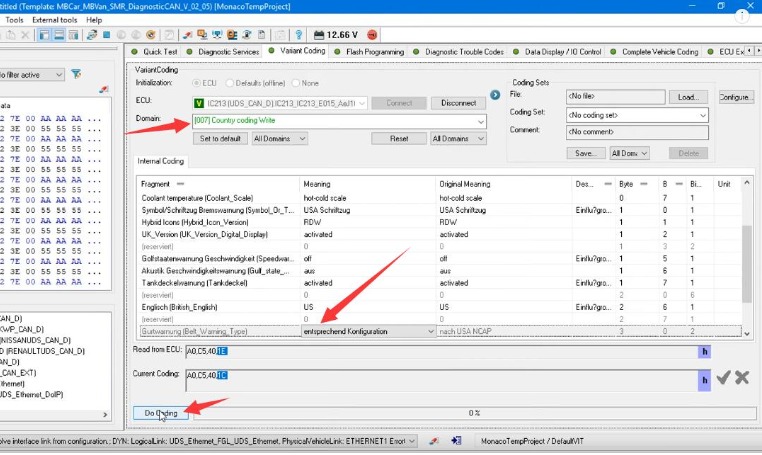
- In DTS Monaco, connect to IC213 (Instrument Cluster Module).
- Navigate to [007] Country Coding Write.
- Locate the setting “Gurtwarnung (Belt_Warning_Type)”.
- Change the value from “nach USA NCAP” to “entsprechend Konfiguration”.
- Once the new value is set, click on “Do Coding”.
- Allow the system to process the change and ensure no errors appear.
 How to Disable Seat Belt Warning in Mercedes with DTS Monaco
Step 3: Perform a Hard Reset to Finalize Coding
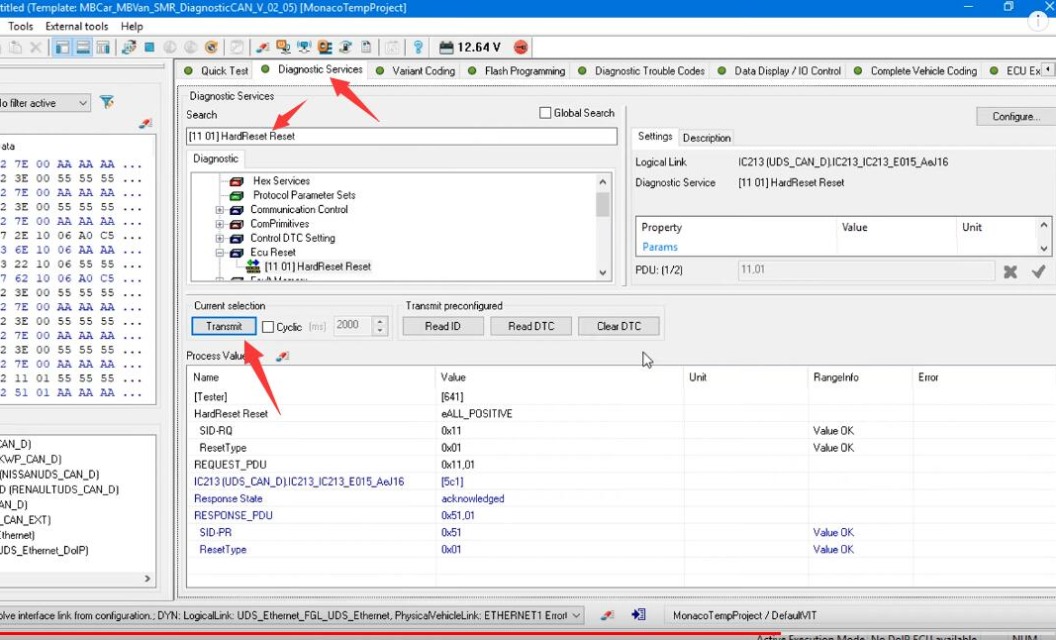
- After the coding process is completed, navigate to the Diagnostic Services tab.
- Select Hard Reset to apply the changes and finalize the coding.
- Wait for the system to reboot and confirm that the seat belt warning has been disabled.