How to Turn Off Collision Prevention Assist Plus
(@admin)
Member
Joined: 10 months ago
[#7]
Step 1: Launch DTS Monaco and Connect to the Vehicle
- Open the DTS Monaco software on your computer.
- Connect the Mercedes-Benz diagnostic interface (C4, C5, or C6) to the vehicle’s OBD-II port.
- Select the appropriate vehicle model from the software’s interface.
Step 2: Choose Variant Coding Mode
- In DTS Monaco, navigate to Variant Coding Mode.
- This mode allows you to access and modify the vehicle’s coding settings.
Step 3: Select the EIS22 Module
- Locate and select the EIS22 (Electronic Ignition Switch) module.
- This module contains the necessary coding options for deactivating Collision Prevention Assist Plus.
Step 4: Modify the Pre-Safe Setting
- In the EIS22 module, find the parameter labeled “299 Pre-Safe”.
- Change its value from “ja” (yes) to “nein” (no).
- This modification will deactivate the Collision Prevention Assist Plus feature.
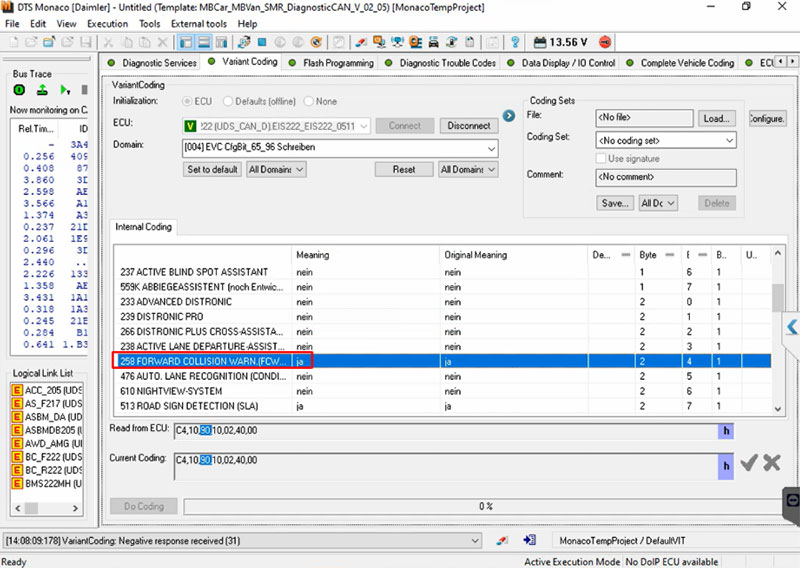 How to turn off ‘Collision Prevention Assist Plus Inoperative’ Message on a Mercedes
Step 5: Apply Coding Changes
- Once you have modified the 299 Pre-Safe parameter, press the “Do Coding” button.
- Wait for the software to apply the changes and confirm that the modification was successful.
Step 6: Restart the Vehicle and Verify Changes
- Turn off the ignition and wait a few minutes.
- Restart the vehicle and check if the Collision Prevention Assist Plus Inoperative warning is no longer displayed.
- If the message persists, repeat the steps and ensure the coding was properly applied.
Important Notes
- Disabling safety features may reduce vehicle safety – Always consult a professional before making coding changes.
- Ensure that your DTS Monaco software is updated to avoid compatibility issues.
- Some Mercedes-Benz models may have additional dependencies, so proper diagnostics should be performed before making changes.