Step 1: Connect and Load Project
- Connect the diagnostic interface to the vehicle and laptop.
- Launch DTS Monaco.
- Load and select the project: ESP 212
This project controls braking and stability-related functions on the W212.

Step 2: Modify Variant Coding
- Navigate to the Variant Coding table.
- In the Domain, select: Konfiguration
- Locate the parameter: Hold
- Change the value from “nein” to “ja”
- Apply and execute the coding to save the configuration.
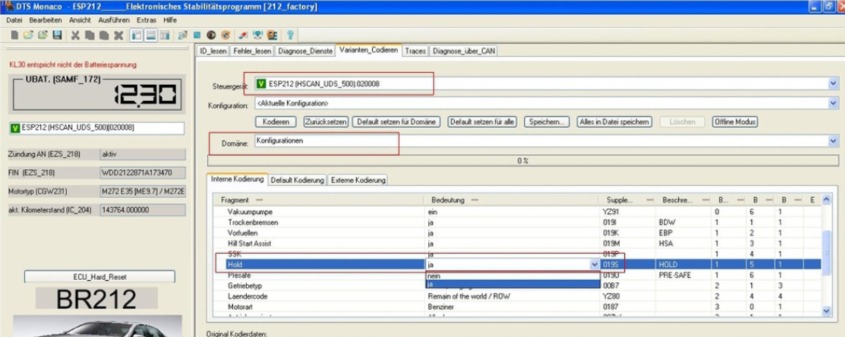
Once completed, the Brake Hold function is activated at the software level.
After coding, cycle the ignition and test the system in a safe environment to confirm proper Brake Hold operation.
Learn More: Mercedes Diagnostic & Coding Guidebook
For technicians and advanced users who want to deepen their Mercedes coding and diagnostic skills, AutoExplain also offers the Combo: Mercedes Master Diagnostic & Coding Guidebook.
This professional guide focuses on real-world Mercedes case studies and includes:
- Xentry / DAS diagnostic workflows
- Variant coding and control unit adaptations
- Common fault analysis and troubleshooting
- Practical coding examples across multiple Mercedes platforms