

This guide covers installing Mercedes WIS (Workshop Information System) and EPC (Electronic Parts Catalogue) through EWA net, including the port change you need so it runs alongside Xentry without conflicts.
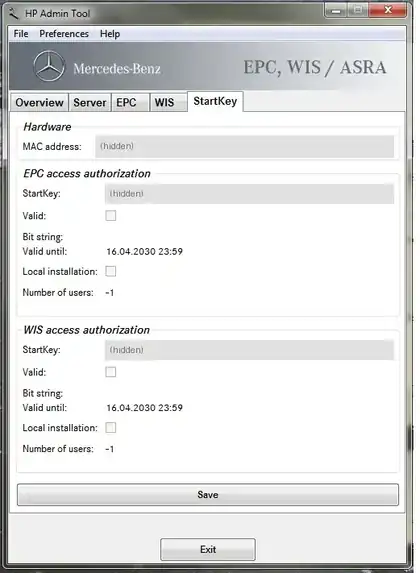
Open EWA Admin and go to the StartKey tab. Enter your EPC and WIS start keys in the two StartKey boxes, then click Save.
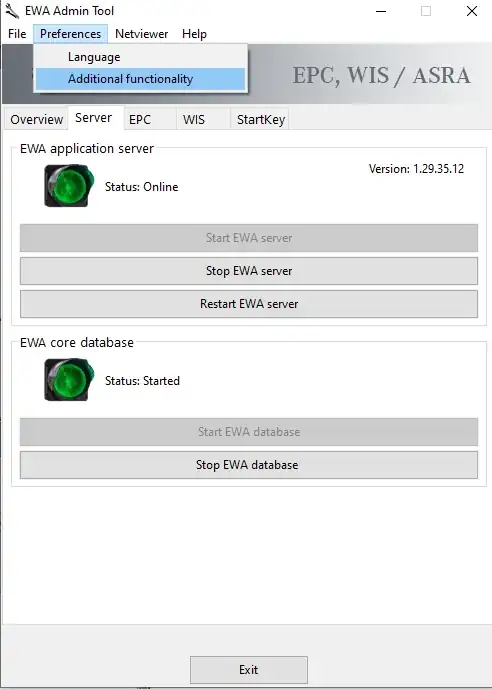
Mount all the remaining EPC ISOs (1of4 to 4of4) so that all five are mounted together. Then, in EWA Admin, open Preferences → Additional functionality:
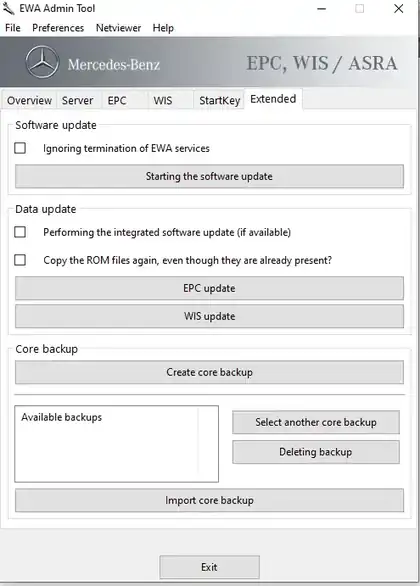
A new Extended tab appears. Open it and click EPC update to install the EPC data. This can take a while.
EWA runs a local web server on port 9000, which conflicts with Xentry. Replacing three config files moves it to port 9010. Copy these from the WIS - EPC FIXES folder, and click Yes to replace the existing files each time:
C:\Program Files (x86)\EWA\config\C:\Program Files (x86)\EWA\config\C:\Program Files (x86)\EWA\server\conf\EWA will now run on port 9010.
http://localhost:9010/EWA-net Tip: bookmark the new address so you don't have to type it each time.
In EWA, open the Administration menu and choose Group. Click the edit icon on the right of the Administrator group row (highlighted below):

The access authorisation will say No access authorization. Change it to As workshop access authorization and save.
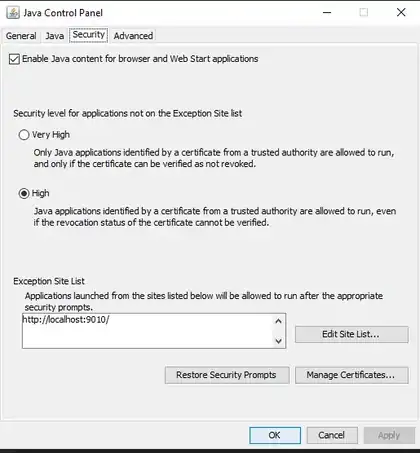
Open the Java Control Panel, go to the Security tab, click Edit Site List and add:
You're ready to launch EPC and WIS. If you have any trouble, send us a message and we'll help. We can also connect remotely and set it up for you.